Identify any card
AI matches artwork, set symbols, and variants — then you confirm the set number.
Pokemon Card Scanner
Scan cards. Check prices. Your collection in your pocket.
Point your camera at any Pokémon TCG card. TCG Pocket App identifies the card, surfaces market prices, and saves scans to a digital binder — without typing set codes by hand.
AI matches artwork, set symbols, and variants — then you confirm the set number.
See listing context and recent sale signals before you trade or list.
Track duplicates, binder totals, and portfolio value over time.
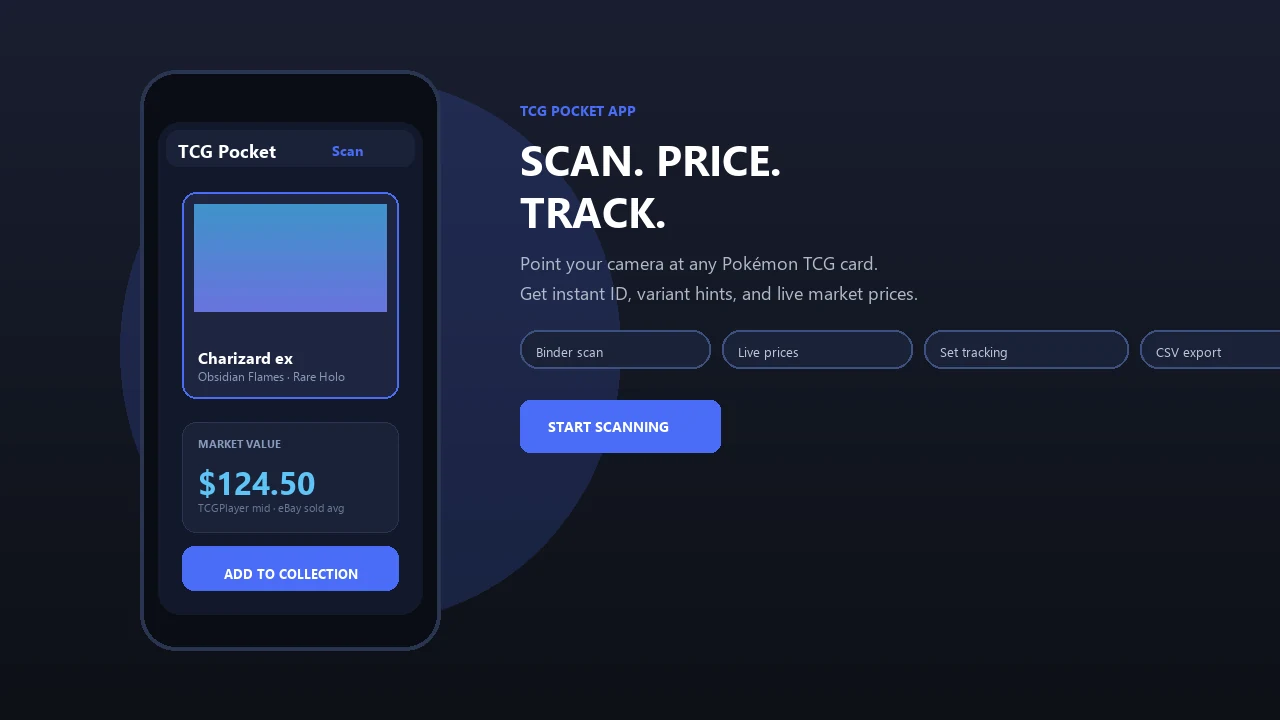
Scan a holo, review the match, check market value, and add the card to your collection — all from one screen.
Definition: Pokemon Card Scanner is a pokemon card scanner app that identifies cards, checks market prices, and tracks collections for Pokémon TCG collectors.
Good AI-powered Pokémon TCG scanners app, live prices, and pocket-sized collection tools deliver faster identification and cleaner records, not guaranteed sale prices.
A good pokemon card scanner app is fast, accurate on tricky variants, and honest about where its prices come from. It should help you make cleaner decisions, not pretend every scan is a guaranteed offer.
The first test is identification quality. Look for an app that can handle promos, reverse holos, foreign-language prints, and near-identical artwork without skipping the set number or variant check. The second test is pricing clarity: recent sold listings usually tell you more than active asking prices, especially when one seller lists a card far above market.
A practical scan-to-binder workflow looks like this:
The best apps save time while keeping those limits visible.
TCG Pocket App removes the slowest part of card checking: typing names, set codes, and variants by hand. A binder-friendly scan is faster when a card corner is tucked behind a plastic seam and you only want a first pass before sorting the pile.
If your priority is fast pull checks after opening packs, TCG Pocket App fits because it combines camera identification with live market lookup in one scan-and-save workflow.
The pricing view matters because stale numbers make trade decisions messy. Pokémon has generated more than $100 billion in estimated lifetime franchise revenue, according to License Global’s franchise revenue reporting (https://www.licenseglobal.com/rankings-lists/top-150-leading-licensors), and that large collector base keeps demand active across vintage, modern, promo, raw, and graded cards.
Mobile-first design also matches collector behavior. Mobile apps make up a large share of global digital game revenue, and most collectors already price-check cards from a phone at shops, shows, or trade nights. For quick collection triage, scanning first is usually easier than manual lookup because the app starts with the card image, not your memory.
A strong pokemon collection tracker app needs three jobs in one place: scan accurately, explain price sources, and keep a usable inventory. TCG Pocket App covers that workflow for collectors who want fewer open tabs and fewer mystery cards in a shoebox.
The scanner matches artwork, layout, set symbol, and print details against Pokémon card data. It helps with vintage, modern, promo, Japanese, and international cards, but a similar Pikachu print can still need a set symbol check.
Pricing should show marketplace context, not just one attractive number. Collectors comparing raw versus graded cards can use TCG Pocket App alongside deeper price research, including our best app for pokemon card prices guide.
The digital binder stores quantity, condition, duplicates, collection value over time, and export-ready records. Serious binder builders may also want the best pokemon collection tracker app breakdown for set-completion workflows.
Small detail, big difference.
A pokemon card scanner app works by capturing a card image, converting visual details into image embeddings, and matching those patterns against a training database. In plain English, the model compares artwork, borders, layout, set symbol, and text placement until it finds the closest card ID.
Model quality and training breadth directly affect scan accuracy. Ring-light glare bouncing off a reverse holo through a nine-pocket binder page can make the scan hesitate, especially on darker cards with edge silvering.
After the card ID is matched, pricing usually comes from a live API call to marketplace data. The useful part is price-source transparency: last-sold data, lowest listing, refresh timing, and whether graded values are separated from raw values. TCG Pocket App stores scanned data locally and/or cloud-syncs it into a digital collection, so you can scan, verify, log, compare, and export.
Anyone dealing with mixed lots gets the most value from TCG Pocket App because the workflow turns loose cards into identified records with condition and quantity fields.
Use TCG Pocket App as a scan-first workflow, then verify the details before making a trade, sale, or grading decision. The plastic crinkle of a binder page is normal; you don’t always need to remove the card for a first scan.
Returning collectors trying to sort an old childhood binder often benefit from TCG Pocket App because each scan creates a record they can verify later against set number and condition.
TCG Pocket App works for several collector types, but the common need is speed with verification. Casual collectors can scan new pulls for quick value checks. Sellers can prepare listings by confirming card names, variants, and recent sale context before writing titles.
Serious collectors can track portfolio-style totals, duplicates, and price trends over time. Investors should still compare raw versus graded pricing through PSA, BGS, CGC, PriceCharting, tcgplayer.com, cardmarket.com, or sold listings before making expensive decisions.
On days when a card show table has handwritten price tags and crowd noise over a quick scan, TCG Pocket App earns its place because it gives a fast reference point before deeper research. The 27% participation figure among U.S. adults ages 18 to 29 also explains why mobile tools feel natural in this hobby. For broader scanner comparisons, our best pokemon card scanner app guide goes deeper.
We evaluate pokemon card scanner apps by testing whether they identify real cards reliably and whether their prices are useful enough to verify, not blindly trust. The goal is a repeatable review process that separates fast scanning from responsible valuation.
Our checks start with mixed piles, not perfect product photos. We include vintage WOTC cards, modern full arts, reverse holos, promos, duplicates, worn edges, and cards inside sleeves or binder pages. Then we compare the app’s suggested value with recent eBay sold results and major TCG marketplaces, watching for thin data, outliers, and stale asking prices.
That last step matters because scanner confidence is not the same thing as collector confidence.
TCG Pocket App is useful, but scanner values are estimates and card identification still needs collector judgment. Treat the app result as a starting point, not the final word.
For binder-heavy workflows, compare scanning behavior in our best pokemon card scanner for binders guide.
Browse by topic: value scanner, iOS app, portfolio, TCG scanner, card show prices, binder scanner, duplicates, CSV export, offline, no subscription, value calculator, wrong variant, scanner myths, scanner privacy, price alerts, iOS widget, selling cards, market vs sold, TCGplayer vs Cardmarket, 1st Ed vs Shadowless, PSA ladder, PSA vs BGS vs CGC, Japanese cards, 30-day results, vs Collectr, vs PriceCharting, vs TCG Companion, vs Ludex, and contact.
Scan physical Pokemon TCG cards with an iPhone camera to identify the card, set, and variant. Clear photos and good lighting help produce more accurate matches.
Save scanned cards to a digital collection and review them later on iOS or the web. Current market estimates can also help when sorting, trading, or selling cards.
The best option should identify physical cards quickly and distinguish between similar printings, sets, and variants. It should also provide clear collection tools and pricing data from relevant marketplaces.
Look for an iPhone app that makes scanning simple while allowing access to the same collection on the web. Reliable search, organized card details, and frequent data updates are more useful than unnecessary extras.
Download the iOS app on your iPhone to scan physical TCG cards with the camera. After installation, place one card on a plain surface and capture it in bright, even light.
Scanned cards can be reviewed, organized, and added to your collection. Web access makes it convenient to view that collection from a larger screen when needed.
A free scanner can help identify physical Pokemon cards without manually searching through set lists. It is useful for checking card names, set numbers, variants, and approximate market values.
Free features and usage limits can vary, so review what is included before scanning a large collection. Market estimates may change over time and should be checked against recent sales before making a trade or purchase.
A card scanner can be worth using when you have many physical cards to identify or catalog. Camera scanning often takes less time than entering card names and set numbers by hand.
Its value depends on recognition accuracy, collection features, and the quality of its pricing data. Collectors should still verify rare cards, unusual variants, and high-value sales before making decisions.
Beginners can use a scanner to identify unfamiliar cards and learn where details such as the set symbol, collector number, and rarity appear. Start with cards in good condition and photograph them against a simple background.
Review every match before saving it, especially when several versions share similar artwork. Building a digital collection also makes it easier to spot duplicates and track which cards are missing from a set.
Pokemon Card Scanner helps iPhone users keep a pocket-sized record of their physical TCG collection. Scan cards with the camera, check identifying details, and save confirmed matches for later reference.
This type of app is intended for real trading cards rather than cards collected inside a digital game. Web access can provide a broader view when reviewing sets, duplicates, or collection values.
Yes, scanning apps can identify many physical TCG cards by comparing visible artwork, text, and card details. Results are usually strongest when the full card is visible, glare is limited, and the image is sharp.
Recognition may be less certain for damaged cards, foreign-language printings, reflective finishes, or cards with nearly identical artwork. Always confirm the set number and variant before relying on a match or estimated price.
Yes. Pokemon Card Scanner offers free access for scanning, card identification, price checks, and basic collection tracking, with optional expanded features depending on the plan.
Pokemon card scanner apps are generally accurate for clear, common cards, but manual verification is needed for variants, promos, foreign prints, and worn cards. Accuracy depends on image quality, training data, and the card database.
Yes. Pokemon Card Scanner supports many vintage Pokémon cards, though extremely obscure prints, regional promos, or damaged cards may require manual confirmation.
Yes. Pokemon Card Scanner works on iPhone (iOS) and web. Android is not offered yet.
Pokemon card prices come from marketplace data, recent sale signals, and listing context where available. Last-sold prices and active listings can differ, so both should be reviewed.
No. A scanner app can help record condition notes, but it cannot replace PSA, BGS, CGC, or another professional grading service.
You can export collection data for personal records, resale planning, insurance notes, or spreadsheet review when export features are available in your account.
Card records already saved may be viewable offline, but live pricing and fresh marketplace data require an internet connection.
No. Scanned prices are market estimates, not guaranteed sale prices, and they can change daily based on demand, condition, and recent sales.
Pokemon Card Scanner is a pokemon card scanner app that uses AI image recognition to identify Pokémon TCG cards, pull market prices, and save scans to a digital collection from your…